


Echo:Secret Share&Make friends
4.423.00 Reviews
App Specs
- Version
- 1.4.5
- Updated On
- License
- Free
- Downloads
- 1,000,000+
- Developer
- RIPPLECHAT
- Categories
- Social
- Platform
- Android
Screenshots




 Analysis by AppCompare
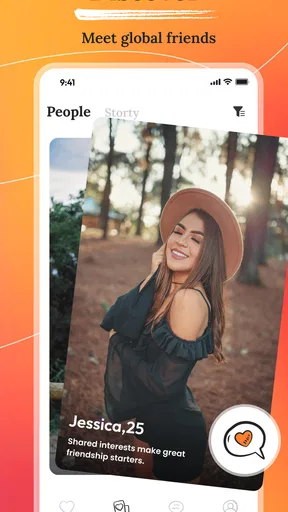
I approached Echo:Secret Share&Make friends as a social app built around a simple promise: meeting people, sharing moments, and moving conversations into video chat. That combination sounds familiar, but the experience feels different from a standard public feed because the emphasis is on direct connection rather than endlessly browsing posts. In my use, its appeal depends less on having every possible social feature and more on whether you want a quicker path from discovering someone to actually talking with them.
Developed by RIPPLECHAT, Echo sits in the social category and is free to install. It is rated for mature users aged 17 and above, which is important to keep in mind before treating it like a general-purpose app for younger family members. The current version is 1.4.5, and it runs on Android 7.0 or later. The app has passed the one-million-install mark and holds an average rating of 4.4 from roughly 9,500 ratings, so it has already attracted a meaningful audience without feeling like an entirely unknown experiment.
What Echo is really trying to make easier
The central capability I noticed is the move from lightweight social interaction to personal conversation. Many social apps are excellent at helping you collect reactions, comments, or followers, but they can leave real conversation buried under public activity. Echo puts more weight on the moment when two people decide to communicate directly, including through video chat.
That focus changes how I judge it. I am not looking at Echo as a replacement for every messaging service, nor as a polished public broadcasting platform. I see it as a meeting place for people who want to make new connections and then decide whether a more personal exchange is worthwhile. The useful question is not “Does it have the largest social toolbox?” but “Does it reduce the distance between finding someone interesting and having a proper conversation?”
For that purpose, the app’s short identity, “Echo,” makes sense. It suggests interaction and response rather than one-way posting. When a social app is designed around replies and personal exchanges, the quality of the people you encounter matters more than the number of buttons on the screen. That also means your results may vary depending on when you use it, how carefully you approach others, and whether the available community matches your interests.
I appreciated that the concept is easy to understand. You can use it when you want to meet someone outside your existing contacts, share something directly, or see whether a text-based exchange is worth taking into video. That makes it more focused than a broad social network where private conversation is only one small part of a much larger system.
Why the video step matters
Video chat is not automatically better than messaging, but it solves a real problem: uncertainty. Text can be friendly, funny, and engaging while still leaving you unsure whether the conversation feels natural in real time. A short video exchange gives both people a faster sense of pace, tone, and comfort.
Worth Reading Before You Choose

EA SPORTS FC Mobile 26 Is a Bigger Football Game, but It Takes Time

Flipboard Shows What News Apps Must Do Beyond the Feed

Switching to Android Auto Means Rethinking Your Driving Routine

Google Calendar Makes a Crowded Week Easier to Manage

Ludo King Makes the Most of the Minutes Between Plans

Baby Panda World Brings Quick Play to Modern Phones, but Its Game Library Feels Busy
I would not treat video as something every new contact should receive immediately. The stronger workflow is to begin with ordinary interaction, pay attention to how the other person communicates, and only switch to video when both sides are comfortable. Echo is most useful when video chat is an option rather than an obligation. That distinction makes the feature practical for cautious users and prevents the app from becoming too demanding too quickly.
There is also a trade-off here. A video-first possibility can make the app feel more personal, but it can also create pressure. Some people are happy to exchange messages while commuting, relaxing, or taking a break; they may not want to appear on camera. If your ideal social app is completely asynchronous, Echo’s strongest capability may not feel like an advantage.
How I would use it in practice
My advice is to treat the first session as a setup and discovery period rather than trying to force a conversation immediately. Look at the way people present themselves, notice whether the tone feels respectful, and avoid assuming that a quick response means a strong connection. The app’s value grows when you use judgment instead of treating every new contact as a potential close friend.
A useful habit is to keep early messages specific. Rather than sending a vague greeting, respond to something the person has shared or explain why you chose to start a conversation. This gives the other person a real opening and makes it easier to tell whether you have anything in common. It also reduces the empty back-and-forth that can make social discovery feel tiring.
When a conversation begins to feel comfortable, video chat can act as a reality check. I would keep the first call short and casual, with no expectation that it must lead to a long-term friendship. That small commitment is important: a brief conversation is easier to accept than an open-ended call, and it lets both people leave politely if the chemistry is not there.
Another practical tip is to separate curiosity from trust. Someone may be interesting without being someone you should immediately share personal details with. I would avoid giving away sensitive information, moving too quickly into private arrangements, or allowing enthusiasm to replace common sense. A social app can make meeting people easier, but it cannot decide who deserves your confidence.
The mature age rating should influence how families think about the app. I would not install it on a child’s device simply because the basic idea sounds like making friends. For adults and older teens who understand online boundaries, it may be a useful way to explore new conversations. For younger users, a supervised and age-appropriate service is the better choice.
A realistic everyday scenario
Imagine finishing work or classes and wanting conversation without contacting the same group of friends again. You open Echo, browse the social side of the experience, and find someone who seems to share an interest you rarely discuss offline. Instead of committing to a long call, you exchange a few messages while having dinner. Later, if the conversation remains comfortable, you try a short video chat.
That scenario shows where the app makes sense. It does not require you to organize an event, join a large group, or publish something for a crowd. It gives you a path from casual discovery to a more direct exchange. If the call goes well, you have the beginning of a genuine connection. If it does not, you have spent less effort than you might have spent arranging a meeting through a broader social network.
There is a second scenario where I would be more cautious. If you are lonely, tired, or looking for instant reassurance, the promise of meeting people can make you overlook warning signs. In that mood, I would use the app slowly and avoid treating a fast connection as proof of trust. The more emotionally important the conversation feels, the more valuable it is to keep your boundaries clear.
Where it differs from ordinary social apps
Compared with a conventional social network, Echo feels better suited to people who want interaction to become personal rather than staying in a public comment section. A large network may be stronger for following news, creators, communities, or established friends. Echo’s appeal is narrower: it is about opening the door to new conversations and potentially using video to make those conversations more immediate.
Compared with a traditional messaging app, it is more relevant when the person you want to talk to is not already in your address book. Messaging apps are usually excellent once a relationship exists, but they are not always designed for discovery. Echo occupies that earlier stage, where you are deciding whether a stranger or new acquaintance is worth getting to know.
Compared with a video-meeting tool, it is more social and informal. A meeting service is generally built around scheduled calls, work, study, or organized groups. Echo is better understood as a place where a conversation can develop naturally. If you need reliable collaboration, screen sharing, formal invitations, or a professional meeting structure, I would choose a dedicated meeting app instead.
This comparison also explains the app’s limitation. A focused social experience may feel refreshing if large platforms overwhelm you, but it may feel incomplete if you expect a full content ecosystem, advanced community management, or the deep controls of a mature messaging service. Echo works best when you accept its purpose rather than asking it to become every other kind of social product at once.
The trade-offs I would consider before installing
The first trade-off is attention. Video chat can create stronger connections, but it asks more from you than a quick reaction or a short message. You need the right setting, enough privacy, and the willingness to be present. That makes the feature valuable for meaningful contact but less convenient for people who want completely passive social browsing.
The second is personal safety. Any service centered on new friendships requires careful decisions about who you engage with and how quickly you reveal information. I would use the app with a clear rule: keep early exchanges inside the service, avoid sending sensitive material, and end conversations that become pushy or disrespectful. The ability to connect quickly is useful, but speed should never be confused with safety.
The third is the possibility of uneven experiences. A social app depends on the people available at the time you use it. You may find a thoughtful conversation quickly, or you may encounter contacts who are not a good match. That is not a flaw unique to Echo, but it matters more here because the app’s main purpose is human connection rather than a tool you can fully control.
Cost is another point worth understanding. The app is free to download, while in-app purchases range from $0.99 to $203.99 per item. I would start with the free experience and only consider a purchase after understanding exactly what it changes for your own use. The broad price range means users should be especially deliberate before confirming anything, particularly if they are experimenting rather than using the app regularly.
I also would not choose Echo solely because it has a large install base. Over one million installs suggest that the concept has reached many users, but popularity does not guarantee that every conversation will suit you. The rating of 4.4 is encouraging, yet social apps are personal by nature: one person may value quick video connections while another may prefer a quieter text-only environment.
Small habits that improve the experience
One of the most useful habits is to decide your preferred pace before you begin. If you know you are not ready for video, do not let the possibility push you into it. If you are open to video, still set a limit for the first call. This keeps the interaction comfortable and makes it easier to judge the person rather than the pressure of the moment.
I would also use conversations as a filter, not just as entertainment. Notice whether someone respects a simple boundary, answers questions without turning everything back to themselves, and accepts a delayed reply. These details tell you more than a polished introduction. A person who handles a small boundary well is usually easier to trust than someone who is merely enthusiastic.
Finally, I would avoid trying to maintain too many new contacts at once. The app can make discovery feel abundant, but meaningful friendships require attention. Keeping a smaller number of conversations helps you remember context, respond thoughtfully, and recognize which connections are actually developing. That is a better use of Echo than collecting contacts you never speak with again.
Who will get the most from Echo?
I think Echo is a good fit for adults and mature older teens who want to meet people beyond their existing circles and appreciate the option of moving from messages to video. It is especially suitable if you find ordinary social feeds distracting and prefer a more direct route toward conversation. People who are comfortable setting boundaries and judging new contacts carefully will get more from it than users who expect the app to manage social decisions for them.
It may also suit someone who has moved to a new place, works remotely, studies away from home, or simply wants more varied conversation. In those situations, the app can serve as a low-commitment first step. You do not have to arrange an in-person meeting just to discover whether you enjoy talking to someone. A text exchange followed by an optional short video call can help you decide what comes next.
I would recommend skipping it if you want a private messenger for people you already know, a professional video-conferencing tool, or a platform centered on long-form content and large communities. It is also not the right choice if you dislike the possibility of being invited into more personal interaction. A service built around new connections will naturally feel less comfortable than a familiar contact list.
My overall view is positive but measured. Echo has a clear social purpose, and its video-chat path gives conversations a more human dimension than a stream of reactions alone. At the same time, that strength brings responsibility: you need patience, sensible boundaries, and realistic expectations about the people you meet. I would recommend trying the free version first, using the mature age guidance seriously, and treating video as a gradual option rather than the goal of every interaction.
Echo is most worthwhile when you want to turn social discovery into a real conversation at your own pace. It will not replace every app on your phone, and it should not be used carelessly, but it offers a focused way to meet people, share experiences, and decide whether a connection deserves more time.
Pros
- Anonymous sharing helps users express thoughts more freely.
- Interest-based discovery can make finding like-minded people easier.
- Simple interface makes posting and browsing quick to learn.
- Ephemeral content may reduce pressure over permanent online profiles.
- Creative posts can encourage friendly conversations and new connections.
Cons
- Anonymous interactions can sometimes lead to rude or inappropriate behavior.
- Content quality may vary widely depending on the active community.
- Privacy settings should be checked carefully before sharing personal details.
- Finding meaningful connections may take time in less active regions.
- Notifications and frequent updates may become distracting for some users.
FAQs for Echo:Secret Share&Make friends
What is Echo: Secret Share & Make Friends?
Echo: Secret Share & Make Friends is a social networking app focused on sharing thoughts, secrets, and personal experiences with other users. Its concept is designed for people who want to express themselves, discover relatable posts, and meet new friends around common interests. Before downloading, remember that the exact features, available communities, and user experience may vary depending on your region and the version installed.
Do I need to create an account to use Echo?
Most social features in Echo generally require users to register or sign in, especially if they want to publish content, interact with posts, follow people, or make friends. During setup, the app may request basic information such as a username, profile details, or contact permissions. Review each permission carefully and avoid sharing sensitive personal information in your profile or public posts unless you fully understand who can see it.
Is Echo: Secret Share & Make Friends safe and private?
Echo may include privacy controls that let you manage your profile, posts, messages, or interactions, but no social platform can guarantee complete privacy. Secrets and personal stories can still be copied, captured, or shared by other users. Before posting, check the app’s privacy policy and account settings, use a nickname if appropriate, block or report suspicious accounts, and never reveal passwords, financial details, your exact address, or other highly sensitive information.
Can I meet and chat with strangers on Echo?
The app’s social purpose suggests that users can discover and interact with people they do not already know. Depending on the available version, this may include comments, reactions, direct messages, or friend requests. Approach these conversations carefully, because online profiles are not always genuine. Do not arrange an in-person meeting without informing someone you trust, and immediately report harassment, scams, inappropriate behavior, or requests for private information.
Is Echo: Secret Share & Make Friends free to download?
Echo may be available to download without an upfront charge, although some features can depend on advertising, optional purchases, subscriptions, or limits placed on free accounts. Check the Google Play Store or Apple App Store listing for the current pricing, supported devices, age rating, and in-app purchase details before installing. If children may use the app, enable parental controls and review payment settings to prevent accidental purchases.


